


Working with Data from CoSAXS#
Learning how to reconstruct data from the CoSAXS beamline
The data#
Data file |
Type |
Download |
Courtesy of |
Reference |
|---|---|---|---|---|
000071.h5 |
Raw |
Maik Kahnt |
||
scan_000071_eiger4m.hdf5 |
Raw |
Maik Kahnt |
The following notebook has been adapted from the original PtyPy run script as provided by the data deposition referenced above.
Reconstruction#
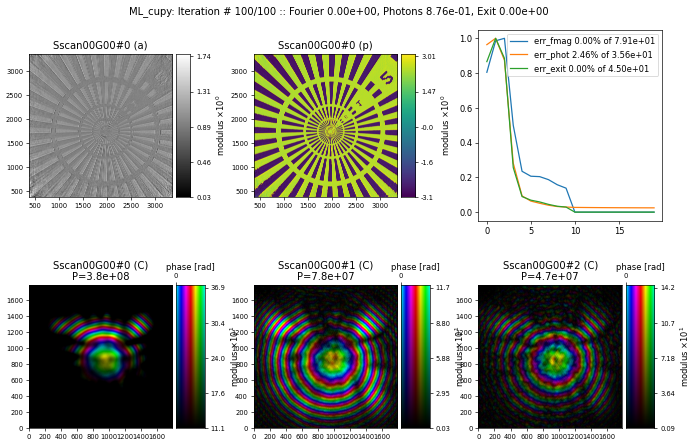
After 100 iterations of DM + 100 iterations of ML, the result looks like this
import ptypy, os
import ptypy.utils as u

ptypy.load_ptyscan_module("nanomax")
ptypy.load_gpu_engines(arch="cupy")

# Root directory of tutorial data
tutorial_data_home = "../../data/"
tutorial_data_home = "/dls/science/groups/imaging/ptypy_tutorials/"

# Dataset for this tutorial
dataset = "ptycho_on_siemensstar_MAXIV_CoSAXS/"

# Absolute path to HDF5 file with raw data
beamtime_basedir = os.path.join(tutorial_data_home, dataset)

# Detector / Sample name
detector         = 'eiger4m'
sample           = '0000_setup'
scannr           = 71
distance_m       = 14.972   # distance between the sample and the detector in meters
beam_diameter_um = 1
defocus_um       = 90000    # distance between the focus and the sample plane in micro meters -> used for inital probe

energy_keV       = 6.840    # incident photon energy in keV ... now read from scan file
cropping         = 1792     # = 1024 + 512 + 256
binning          = 1
tilt_deg         = -0.5

# General parameters
p = u.Param()
p.verbose_level = "interactive"
p.run = 'scan%d' % scannr
p.frames_per_block = 10

# Set io settings (no files saved)
p.io = u.Param()
p.io.rfile = None
p.io.autosave = u.Param(active=False)
p.io.interaction = u.Param(active=False)

# Live-plotting during the reconstruction
p.io.autoplot = u.Param()
p.io.autoplot.active=True
p.io.autoplot.threaded = False
p.io.autoplot.layout = "jupyter"
p.io.autoplot.interval = 10

# Scan parameters
p.scans = u.Param()
p.scans.scan00 = u.Param()
p.scans.scan00.name = 'BlockFull'
p.scans.scan00.coherence = u.Param()
p.scans.scan00.coherence.num_probe_modes = 3       # number of probe modes
p.scans.scan00.coherence.num_object_modes = 1      # number of object modes

p.scans.scan00.data = u.Param()
p.scans.scan00.data.name = 'NanomaxContrast'
p.scans.scan00.data.path = beamtime_basedir+'/raw/'+sample+'/'
p.scans.scan00.data.detector = detector
p.scans.scan00.data.maskfile = {'eiger4m': beamtime_basedir+'/macros/masks/eiger_4M_blinking_pixels.h5'}[detector]
p.scans.scan00.data.scanNumber = scannr
p.scans.scan00.data.xMotor = 'sx'
p.scans.scan00.data.yMotor = 'sy'
p.scans.scan00.data.zDetectorAngle = 0.0    # rotation of the detector around the beam axis in [deg]
p.scans.scan00.data.xyAxisSkewOffset = tilt_deg
p.scans.scan00.data.shape = cropping        # size of the window of the diffraction patterns to be used in pixel
# p.scans.scan00.data.save = 'append'
# p.scans.scan00.data.dfile = path_data       # once all data is collected, save it as .ptyd file
p.scans.scan00.data.center = (1248,860)     # center of the diffraction pattern (y,x) in pixel or None -> auto
p.scans.scan00.data.cropOnLoad = True       # only load used part of detector frames -> save memory
                                            # requires center to be set explicitly
p.scans.scan00.data.xMotorFlipped = True
p.scans.scan00.data.yMotorFlipped = False
p.scans.scan00.data.orientation = {'eiger4m': (False, True, False)}[detector]
p.scans.scan00.data.distance = distance_m   # distance between sample and detector in [m]
p.scans.scan00.data.psize = {'eiger4m': 75e-6}[detector]
p.scans.scan00.data.rebin = binning
p.scans.scan00.data.energy = energy_keV    # incident photon energy in [keV], now read from file
p.scans.scan00.data.I0 = None
p.scans.scan00.data.min_frames = 10
p.scans.scan00.data.load_parallel = 'all'

p.scans.scan00.illumination = u.Param()
p.scans.scan00.illumination.model = None                              # option 1: probe is initialized from parameters
p.scans.scan00.illumination.aperture = u.Param()
p.scans.scan00.illumination.aperture.form = 'circ'                    # initial probe is a circle
p.scans.scan00.illumination.aperture.size = beam_diameter_um *1.e-6   # of this size in [m] the focus
p.scans.scan00.illumination.propagation = u.Param()
p.scans.scan00.illumination.propagation.parallel = 1.*defocus_um*1e-6 # propagate the inital estiamte -> gives phase curvature

### details on how to init multiple probe modes differently
p.scans.scan00.illumination.diversity = u.Param()
p.scans.scan00.illumination.diversity.power = 0.1         # Power of modes relative to main mode (zero-layer)
p.scans.scan00.illumination.diversity.noise = (0.5, 1.0)  # (rms, mfs, rms_mod, mfs_mod)

############################################################################
# 1st use the difference map algorithm
############################################################################

# general
p.engines = u.Param()
p.engines.engine00 = u.Param()
p.engines.engine00.name = 'DM_cupy'
p.engines.engine00.numiter = 100                    # number of iterations
p.engines.engine00.numiter_contiguous = 10           # save a dump file every x iterations
p.engines.engine00.probe_support = 3                 # non-zero probe area as fraction of the probe frame
#p.engines.engine00.probe_update_start = 50          # number of iterations before probe update starts

############################################################################
# 2nd use the maximum likelyhood algorithm
############################################################################

# general
p.engines.engine01 = u.Param()
p.engines.engine01.name = 'ML_cupy'
p.engines.engine01.numiter = 100                   # number of iterations
p.engines.engine01.numiter_contiguous = 10          # save a dump file every x iterations
p.engines.engine01.probe_support = 3

# start the reconstruction
P = ptypy.core.Ptycho(p,level=5)